A better way to view tasks in pages
I think the way we are currently able to view tasks in pages isn’t intuitive so I wanted to share some ways I think this could be improved.
My idea is that instead of having the whole page be a placeholder for tasks (with the priority, tag, deadline, etc. at the top), tasks should be shown in a page through links and/or databases. I’ll be using Notion as an example as they do this the best. Also note: when I say tasks I’m also including habits and events in here too.
Tasks shown in a database
We can add a database view of tasks to a page. This would be separate from the current formatting table we have. This database starts out as a table view of all of our tasks which we can then filter and sort to only show the tasks we want to see on a page. We can also create new tasks here too. We’ll be able to easily see a list of our tasks cleanly grouped together, as well as, all of the associated properties. The database can be placed anywhere on the page and we can add multiple databases to a page.
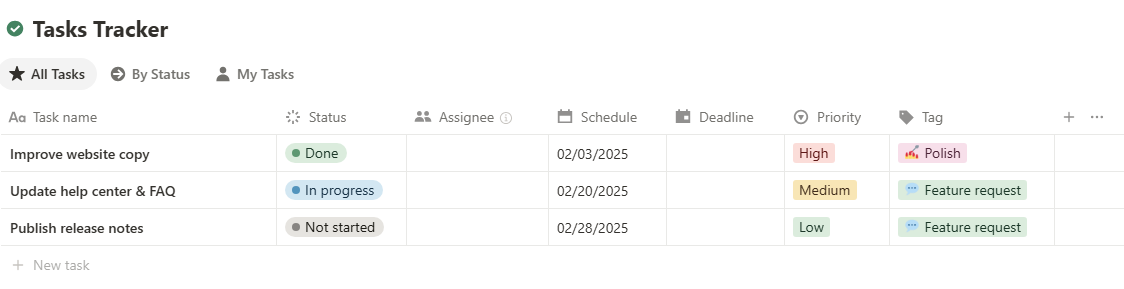
Add option for different database views: Offer gnatt (timeline), table, list, gallery, and kanban (board) views so we can see the tasks differently.
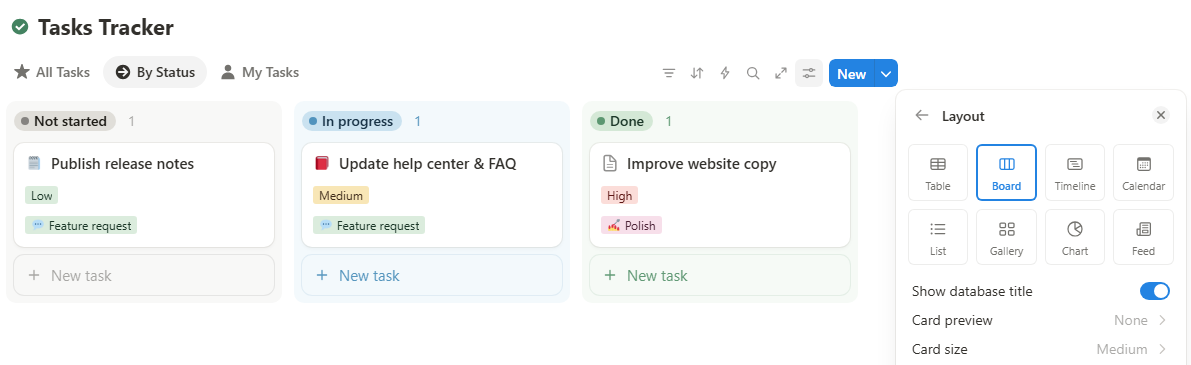
Filter and sort: Allow us to filter by page, type (task, habit, event), tag, completion, etc. and sort by deadline, priority, duration, etc.
Hide/show properties: We can hide or show priority, tag, deadline, etc. properties from the database view.
Tasks shown as links
The same way we can link to a page is the way I’d like to link to a task, habit, or event. It could also include a checkbox next to it.
These are just my thoughts, but I’d love to hear others’ opinions.
Log in to comment and vote
Comments1
WP
Aug 17, 2025
I agree with Faith. One thing that currently holds me back from using ByDesign as my all-in-one planner is the way tasks are displayed.
ByDesign has done a fantastic job with task entry, but the viewing experience could be improved. When I sit down for my planning or review sessions, I’d love a way to see all my tasks clearly laid out on one page — similar to how I currently use Notion.
Right now, I often find myself planning in Notion and then copy-pasting into ByDesign. But this creates friction because of differences in titles, structure, and syncing.
That said, I really love what the ByDesign team has built so far, and I’m excited to see how the platform continues to grow!